Your city or nearby
Search a city, or pick a nearby radius of 5, 10, 25, 50 or 100 km. Nearby shows only people who have also shared an area in the last 24 hours.
MoyMate, inside the moymenyu app
Coffee, a walk or a conversation. Find people in your city or nearby who share your interests. Say hello, and start chatting once they accept.
Free · 18 and older · Android 7 or later
Add your name, age, city, interests and a short introduction, plus a photo if you like. Pick your intention and choose whether to appear in People.
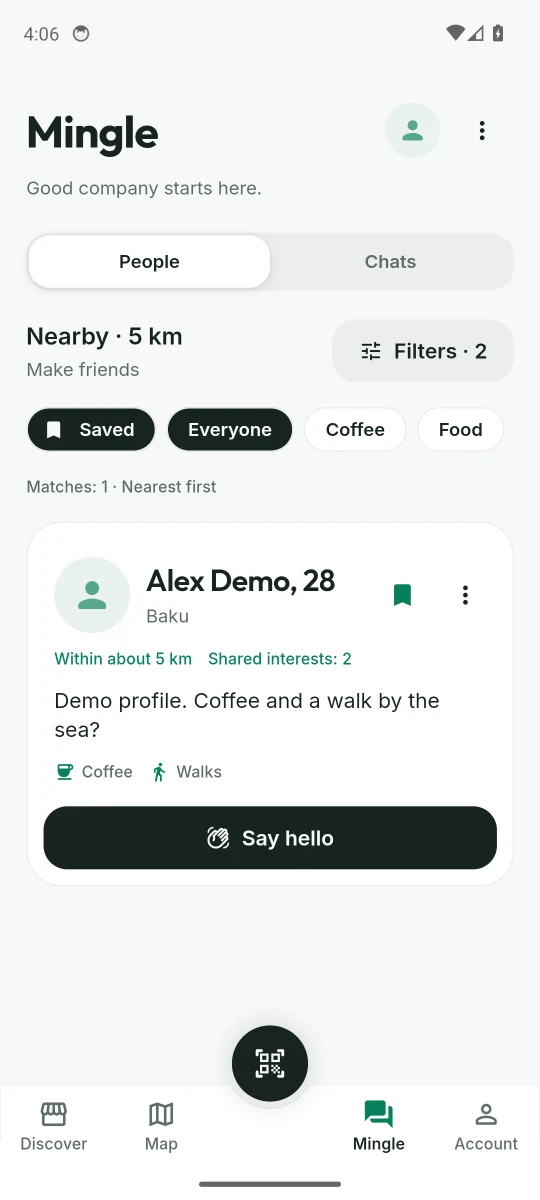
Open People and set your filters: city or nearby, age and interests. Browse at your own pace. The app remembers your filters for next time.
Send a short hello. The other person decides whether to accept. If they do, you both continue in Chats.
Search a city, or pick a nearby radius of 5, 10, 25, 50 or 100 km. Nearby shows only people who have also shared an area in the last 24 hours.
Pick “Make friends” or “See where it goes”. People shows one intention at a time, so the two stay separate.
Set an age range and pick up to five interests. People who match any of your chosen interests can appear.
Sort by shared interests or by newest profiles. See what you have in common before you say hello.
Save profiles for later. Show only saved people or profiles with photos, and hide people you have already contacted.
Once your hello is accepted, send text messages. Your conversations stay together in MoyMate.
You choose whether to appear in People, which hellos to accept and what to share.
MoyMate is part of the moymenyu app for Android. The app is a direct APK download from moymenyu.com/downloads. It is not on Google Play. Open the file on your phone and follow the install prompts.
Android 7 or later · There is no iPhone app yet, so MoyMate needs an Android phone for now. On iPhone, you can still open a restaurant’s QR menu in your browser.
Yes. Downloading the moymenyu app and using MoyMate costs nothing.
No. You can find people and chat without scanning a table.
Adults aged 18 or older. You confirm you are 18 or older when you create a profile. Age is self-reported and profiles are not identity-verified. If you think someone under 18 is using MoyMate, report their profile.
No. Someone can send you a hello, but messages can be sent only after you accept it. You can decline any request, and blocking stops further contact.
Your profile shows the city you enter. Your phone’s location is used only if you turn on Nearby. The app rounds it to an approximate area before sending it and uses it for 24 hours. You can remove it sooner in Filters. Others see an approximate distance, never your exact coordinates. There is no background location tracking.
Only the two people in a conversation can open it in the app. If you report someone, our moderators can review the message you include. Messages are stored on our servers and are not end-to-end encrypted. Your phone number, orders and table number are never shared through MoyMate.
Yes. MoyMate was called Mingle. It is the same meet-people feature of the moymenyu app, with a new name. Your app may still show the name Mingle until it is updated.
Go to MoyMate → More options → Delete MoyMate profile. This removes your profile, photo, saved profiles and conversations. Your restaurant orders stay. When either person deletes their profile, your shared conversation is removed too. To also remove your device identity, use Account → Delete my data.